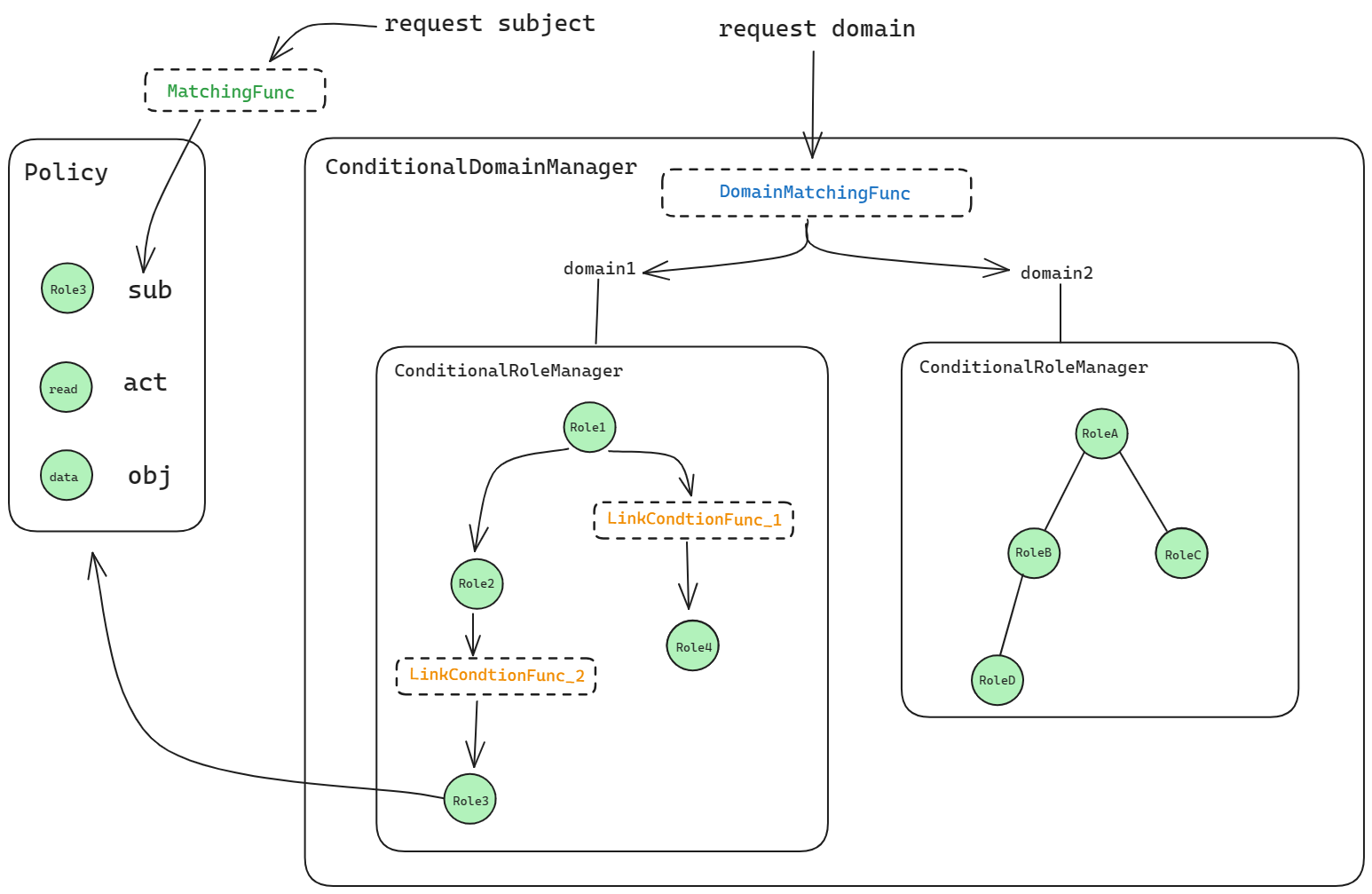
RBAC with Conditions
Pengurus Peranan Bersyarat
The Conditional RoleManager lets you attach condition functions to role assignments (e.g. time-bound roles). A role assignment is valid only when its condition function returns true.
Example: time-based role validity. Model:
model.conf
[request_definition]
r = sub, obj, act

[policy_definition]
p = sub, obj, act

[role_definition]
g = _, _, (_, _)

[policy_effect]
e = some(where (p.eft == allow))

[matchers]
m = g(r.sub, p.sub) && r.obj == p.obj && r.act == p.act
The (_, _) in the role definition are the extra arguments passed to the condition function (e.g. start and end time). Policy:
p, alice, data1, read
p, data2_admin, data2, write
p, data3_admin, data3, read
p, data4_admin, data4, write
p, data5_admin, data5, read
p, data6_admin, data6, write
p, data7_admin, data7, read
p, data8_admin, data8, write

g, alice, data2_admin, 0000-01-01 00:00:00, 0000-01-02 00:00:00
g, alice, data3_admin, 0000-01-01 00:00:00, 9999-12-30 00:00:00
g, alice, data4_admin, _, _
g, alice, data5_admin, _, 9999-12-30 00:00:00
g, alice, data6_admin, _, 0000-01-02 00:00:00
g, alice, data7_admin, 0000-01-01 00:00:00, _
g, alice, data8_admin, 9999-12-30 00:00:00, _
Basic usage
Call AddNamedLinkConditionFunc to bind a condition function to each g rule (or the relevant user–role pair). At enforce time, the extra policy fields are passed to the function; the assignment counts only if the function returns true.
e.AddNamedLinkConditionFunc("g", "alice", "data2_admin", util.TimeMatchFunc)
e.AddNamedLinkConditionFunc("g", "alice", "data3_admin", util.TimeMatchFunc)
e.AddNamedLinkConditionFunc("g", "alice", "data4_admin", util.TimeMatchFunc)
e.AddNamedLinkConditionFunc("g", "alice", "data5_admin", util.TimeMatchFunc)
e.AddNamedLinkConditionFunc("g", "alice", "data6_admin", util.TimeMatchFunc)
e.AddNamedLinkConditionFunc("g", "alice", "data7_admin", util.TimeMatchFunc)
e.AddNamedLinkConditionFunc("g", "alice", "data8_admin", util.TimeMatchFunc)


e.enforce("alice", "data1", "read")     // expect: true
e.enforce("alice", "data2", "write")    // expect: false
e.enforce("alice", "data3", "read")     // expect: true
e.enforce("alice", "data4", "write")    // expect: true
e.enforce("alice", "data5", "read")     // expect: true
e.enforce("alice", "data6", "write")    // expect: false
e.enforce("alice", "data7", "read")     // expect: true
e.enforce("alice", "data8", "write")    // expect: false
Custom condition functions
Signature:
type LinkConditionFunc = func(args ...string) (bool, error)
Example implementation:
// TimeMatchFunc is the wrapper for TimeMatch.
func TimeMatchFunc(args ...string) (bool, error) {
    if err := validateVariadicStringArgs(2, args...); err != nil {
        return false, fmt.Errorf("%s: %s", "TimeMatch", err)
    }
    return TimeMatch(args[0], args[1])
}

// TimeMatch determines whether the current time is between startTime and endTime.
// You can use "_" to indicate that the parameter is ignored
func TimeMatch(startTime, endTime string) (bool, error) {
    now := time.Now()
    if startTime != "_" {
        if start, err := time.Parse("2006-01-02 15:04:05", startTime); err != nil {
            return false, err
        } else if !now.After(start) {
            return false, nil
        }
    }

    if endTime != "_" {
        if end, err := time.Parse("2006-01-02 15:04:05", endTime); err != nil {
            return false, err
        } else if !now.Before(end) {
            return false, nil
        }
    }

    return true, nil
}
Conditional RoleManager with domains
With domains, the role definition has an extra domain field and the condition arguments in parentheses. Model:
[request_definition]
r = sub, dom, obj, act

[policy_definition]
p = sub, dom, obj, act

[role_definition]
g = _, _, _, (_, _)

[policy_effect]
e = some(where (p.eft == allow))

[matchers]
m = g(r.sub, p.sub, r.dom) && r.dom == p.dom && r.obj == p.obj && r.act == p.act
policy.csv
p, alice, domain1, data1, read
p, data2_admin, domain2, data2, write
p, data3_admin, domain3, data3, read
p, data4_admin, domain4, data4, write
p, data5_admin, domain5, data5, read
p, data6_admin, domain6, data6, write
p, data7_admin, domain7, data7, read
p, data8_admin, domain8, data8, write

g, alice, data2_admin, domain2, 0000-01-01 00:00:00, 0000-01-02 00:00:00
g, alice, data3_admin, domain3, 0000-01-01 00:00:00, 9999-12-30 00:00:00
g, alice, data4_admin, domain4, _, _
g, alice, data5_admin, domain5, _, 9999-12-30 00:00:00
g, alice, data6_admin, domain6, _, 0000-01-02 00:00:00
g, alice, data7_admin, domain7, 0000-01-01 00:00:00, _
g, alice, data8_admin, domain8, 9999-12-30 00:00:00, _
Basic usage
Use AddNamedDomainLinkConditionFunc with the domain and user–role–condition args. The condition is evaluated the same way; it receives the extra parameters from the g rule.
e.AddNamedDomainLinkConditionFunc("g", "alice", "data2_admin", "domain2", util.TimeMatchFunc)
e.AddNamedDomainLinkConditionFunc("g", "alice", "data3_admin", "domain3", util.TimeMatchFunc)
e.AddNamedDomainLinkConditionFunc("g", "alice", "data4_admin", "domain4", util.TimeMatchFunc)
e.AddNamedDomainLinkConditionFunc("g", "alice", "data5_admin", "domain5", util.TimeMatchFunc)
e.AddNamedDomainLinkConditionFunc("g", "alice", "data6_admin", "domain6", util.TimeMatchFunc)
e.AddNamedDomainLinkConditionFunc("g", "alice", "data7_admin", "domain7", util.TimeMatchFunc)
e.AddNamedDomainLinkConditionFunc("g", "alice", "data8_admin", "domain8", util.TimeMatchFunc)


e.enforce("alice", "domain1", "data1", "read")              // expect: true
e.enforce("alice", "domain2", "data2", "write")             // expect: false
e.enforce("alice", "domain3", "data3", "read")              // expect: true
e.enforce("alice", "domain4", "data4", "write")             // expect: true
e.enforce("alice", "domain5", "data5", "read")              // expect: true
e.enforce("alice", "domain6", "data6", "write")             // expect: false
e.enforce("alice", "domain7", "data7", "read")              // expect: true
e.enforce("alice", "domain8", "data8", "write")             // expect: false
e.enforce("alice", "domain_not_exist", "data1", "write")    // expect: false
e.enforce("alice", "domain_not_exist", "data2", "read")     // expect: false
e.enforce("alice", "domain_not_exist", "data3", "write")    // expect: false
e.enforce("alice", "domain_not_exist", "data4", "read")     // expect: false
e.enforce("alice", "domain_not_exist", "data5", "write")    // expect: false
e.enforce("alice", "domain_not_exist", "data6", "read")     // expect: false
e.enforce("alice", "domain_not_exist", "data7", "write")    // expect: false
e.enforce("alice", "domain_not_exist", "data8", "read")     // expect: false
Custom condition functions use the same signature. Note: DomainMatchingFunc (domain pattern), MatchingFunc (subject/object pattern), and LinkConditionFunc (condition on a role assignment) are independent and apply at different stages.